
Google hacking is uncovering information indexed on the web that weren’t supposed to be indexed. Sometimes, it is because of the ignorance of webmaster or sometimes people just don’t know what they are letting Google index!
I have read about Google hacks and lately have been hearing more about people using Google to download music as more and more P2P networks are being monitored.
I have found that some people have in fact created web services for those who can’t remember the custom search queries. Here are some of them:
G2P
Google to Person sports some crafty searches to look for not just songs but software, ebooks, ringtones, etc. I found this excerpt at G2P amusing!
-P2P/BT is being monitored — Using Google we can download a lot more safely. We are simply just following a link — curious how it leads directly to the file we are looking for. =)
Papaiti
 Papaiti offers a simple interface made for those averse to using Google’s Advanced Search yet want to find mp3 files indexed in the Internet. You just type in the Song and the artist name and it offers Google results in the same page. You could even report sites that are trying to trap visitors with fake links and it will be excluded from future searches.
Index Of
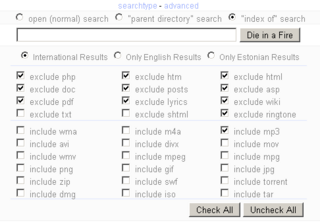
Index Of is a more comprehensive interface letting you search for a variety of file types using Google. You can search for  mp3, avi, wma, divx, iso, jpeg, mpeg, mpg, etc, anything you could you would ever want to search for.
Firefox Smart Keyword Search – FriedBeef
One of the earlier methods but simple enough to use Firefox’s lesser known feature, keyword. You just bookmark a Google search query with a keyword like ‘music’ in your Firefox bookmarks. And to search for eminem, all you need to do is type in music eminem in your location bar and hit enter.
Tyoogle – your mom
 I couldn’t make sense of the name! But, Tyoogle sports the most customizable interface with awesome search filtering among the ones here. You can control the file types you are looking for as well as exclude files types such as html, php, etc when you are looking for media files.
Bonus – Google Power Search
I know I said 5, but you have been so good reading through the list. So, here is an extra.
If you are into finding document types like doc, pdf, xls, etc., Google Power Search will come to your rescue besides letting you search for pictures, videos and music files. Plus, the comprehensive search page lets you search any of the dozens of Google services right from one page.
Disclaimer: I do not recommend or support illegal downloads of music or videos. The above list is for educational purposes only! 🙂


My wife is loving this post haha. Nice one buddy.
Anytime Brown! Glad she loves educational stuff. 🙂
I just spruced up my Blogroll and you are in it!
hi i enjoyed the read
thanks for the papaiti.com plug
@Jenifer.. thanks for taking the time to comment! Glad you enjoyed it..
@giles.. you are welcome! Your interface is very useful for people averse to using the Google Advanced Search strings. 🙂
Sweet, that is much easier than using limewire, and bloating your pc with all sorts of adware and viruses. Cheers.
Yes, err…educational use. Thanks for ideas. I needed another excuse to put off work while perusing for cool content.
Nice info.. May be good to fill my mp3 player!
Great post. I did not know about have the sites they make it easy to find what ever you want. This is one page I saved to favorites.
Tyoogle isn’t a search engine plugin anymore. It’s some kind of a digg clone :/