
 Google Alerts in an excellent service by Google that is not often talked about like GMail or Google Reader. It has to be one of the hidden treasures in Google’s suite of web applications.
Google Alert is a simple service where you get an email alert for any search term you specify. You can choose to have your topic searched in one of the following areas. If a content is indexed by Google, then you will be able to find it with this service.
- News
- Blogs
- Web
- Videos
- Groups or
- Comprehensive
You can choose to receive alerts to your email once a day, as it happens or once a week depeneding on how frequently you want to be notified. Spend an extra couple of minutes thinking before you choose ‘As it happens’ as you can very soon get tired of all the emails you get alerted with. If you don’t read the alerts then there is no point signing up for them.
1. Look who’s talking
If you are a blogger, you probably rely on trackbacks to get notified of who is linking to you or talking about you. But, trackbacks aren’t 100% reliable and sometimes you might not get notified of someone’s effort in taking the time to link to you. One great advantage is that you could find out any conversation about your blog even if the other blogger did not link to you. Networking is crucial for a blog to be successful and you really do not want to miss someone else actually talking about you to their readers. Good or bad, I want to know if you talk about ShanKri-la in your blog. 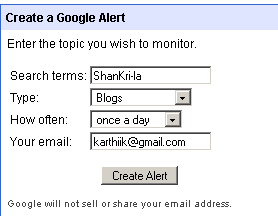
How to: Set up a Google Alert with your blog name and set up a comprehensive search and ask to be emailed once a day or once a week depending on how soon you want to know who is talking about you. Or you could just set up a Blog search to narrow your search to other blogs linking to your blog.
2. Follow your Niche
If you are a Niche blogger, you have to stay current to be on top of the topic you are writing about. You might rely on a few other sites in your niche to stay updated. How would you like to have an email everyday that has current information on the topic you are interested in? As a tech blogger, I like to focus on topics like RSS feed readers, Firefox, Web applications and I have alerts created on each of these topics to stay current.
3. Blog Post Ideas
Are you facing writers block? Set up keywords in Google Alerts that you would like to write on and get a daily dose of inspiration and ideas.
One great thing about the keywords is the advanced search criteria that you use in a Google Search also works in Google Alerts. Just go to Google search’s Advanced Search page and build your complex query. Then just copy that and paste it into Alerts.
4. Watch for announcements
Are you into writing about breaking news stories? Set up Google Alerts in News and subscribe for alerts and get notified ‘as it happens’.
5. Track yourself
Besides tracking your blog, you could just plug in your name and see if you come up in web searches. Even if you don’t appear in the weekly alert you have set up, it is still cool to see what other people with your name are appearing in searches for. You could even set up job search alerts in your area like ‘web developer detroit’.
Conclusion
You could easily create and delete alerts if you already have a GMail account. Or you could sign up for a new account in a few minutes. Play with it and experiment with the results. These are just a few ways I have been using Google Alerts.
How do you use Google Alerts?


Solid tips buddy. I keep forgetting to create an alert for my name. Not that anything would pop up lol. Stumbled.
Dude, you are kidding me. I just did a blog search for Brown Baron and you are like everywhere! 🙂
Appreciate the stumble!
K-IntheHouse,
I use Google Alerts to keep track of my work which has been purchased through third-party sites such as Constant Content, to make sure the buyers are complying with the terms of the purchase agreement (e.g., not removing my byline from or altering content that they haven’t purchased all rights to.)
In addition to setting up an alert using my byline–which can help me discover unauthorized changes to legitimately purchased works–I set up alerts using unique phrases from my articles or blog posts, so my work will pretty much be found anywhere on the internet–even if my byline has been removed–which can help prevent plagiarism.
I’ve written several posts on my blog about this subject. Here’s one: “Google Alerts Can Help You Detect Misuse or Abuse of Your Work!” It can be found at the following URL/link: http://www.writersnotes.net/google-alerts-can-help-you-detect-misuse-or-abuse-of-your-work/.
Hope you don’t mind my posting this link. Just thought that since my post answers the question asked in your post, it would be appropriate to share it–particularly since it could prove helpful to your readers.
Thanks!
Jeanne
Jeanne.. how have you been? Let me thank you for taking the time to share your experience with Google Alerts with us.
That is another great way of using Google Alerts and I think it’s use can only be limited by one’s imagination. 🙂
The byline idea is a great way to track plagiarism! I am heading over to check out your post on this topic and I’m glad you posted the link. I welcome my readers to post links to their own posts if it’s relevant to the conversation. And your comment has added some input to this conversation!
One other great side effect of tracking your blog with Google Alerts (I forgot to mention in the post) is that you can find out if Google is indexing your content regularly. If you don’t see your current post in the alerts, then there may be some problem with Google indexing your site. This is especially true after upgrading WordPress or installing plugins that may affect this.
K-IntheHouse,
Thanks for your friendliness and openness to posting links to the works of others! I’m sure I speak for all of us when I say “I appreciate it”!
I’ve been fine–and very busy! Hope you have, too!
Google Alerts can be helpful in so many ways! (Your last-mentioned use for them–checking to see whether Google is indexing your content–is another great benefit of using them–one I hadn’t thought of.) Sometimes I also find links to my content through Google Alerts–often before they even show up on Technorati.
It’s really helpful, for those who sell their work through Constant Content (since we often don’t know where our work will be posted on the internet once it’s been purchased,) to find out which websites have posted our work. This is nice to know–even if they haven’t altered it or removed our byline.
I tend to use comprehensive “as-it-happens” alerts, so I can find my work on any type of website and will be notified as soon as the Googlebot finds it.
Google Alerts are a helpful tool for any internet writer and I highly recommend them!
Have a great day!
Jeanne
Jeanne.. you are welcome! I’m glad you liked the idea. 😀
I guess if we think about it we might come up with more ways of using it. Only sky is the limit!
Have a wonderful day yourself!
Google Alerts are the bomb! A friend of mine, David Cooley, pushed me on it… and I haven’t looked back since… lets see if he gets a David Cooley alert here and comments.
These are nice tips, I never used Google for this matter, but probably will try them someday!
Off topic, sorry – just wanted ask what plugin you use to display country, browser and OS for commentators? Thanks 😀
Hi IngaOz,
Thanks a bunch! 🙂 Once you try it, it is like a personal assistant for you and it will fetch everything you need right in to your Gmail. I think every blogger should at the least create a Google Blog Search alert for the ‘niche’ terms they blog about.
I digress. I use the ‘FireStats’ WordPress Plugin and the settings panel has an option to turn this on. It is actually a stats gathering plugin and I use it pretty much for this functionality.
I am working on a Top WordPress Plugins post and should post in a couple of days. It has all the juicy plugins I use and more.. 😛
Thank You! I’ll try that plugin and will be waiting for your post about top plugins! 😀
very detailed post. nice
Good post. I already have alerts set up for some keywords and my own name 😀
Cool tips man. Another tool that does the same things is FaveBot. I hope Google Alert will come up with more functions in the near future. It is quite promising.
Syahid A.s last blog post..20 Fantastic Mozilla Firefox Compact Themes
Shankar.. thanks! It supplements nicely to track links to your blog along with Technorati Incoming Links plugin.
Syahid.. Favebots looks like a cool service I might try this week. You are right that Google Alerts could use some more features to fine tune alerts.
I’ve never used these before, but will definitely check them out, if only to see what other people might be saying about me! 😉
Zaths last blog post..Hi-Tech Gadgets
I’m not using Google Alert since i’m not really that tech savvy. However, i’d love to utilize this site since i believe this is a great source for SEO purposes.