Blogging Tip: Turn off FeedBurner Redirect in RSS Feeds
As a voracious RSS feed consumer, I have always been irked by the fact that a lot of FeedBurner enabled blog feeds have the title URL point to a FeedBurner URL instead of a link to the actual post.
If I wanted to bookmark the post or save the link to blog about it, I cannot do it by simply right-clicking. I have to open the post in a new tab/window to get the actual post link. Or I could hunt the bottom of the post to see if the feed has a Permalink to the post.
Recently, I came across this tip in gHacks where you can turn off FeedBurner redirect and make your post title link directly to your post URL.
Here is how you do it:
- Login to your FeedBurner account
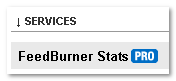
- Choose the feed you want to edit
- Under the Analyze tab, click on the ‘FeedBurner StatsPRO’ at the very bottom of the sidebar. (FeedBurner PRO was made free after Google acquired it)
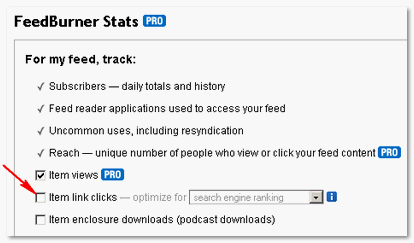
- Uncheck ‘Item Link Clicks’ shown in the screenshot and save it.
After I made this change, all my feed titles now have direct link to my posts. I am going to lose the stats related to this. But right now, making it easy for my readers and fellow bloggers to use my posts is more important to me than those stats.
Also, a FeedBurner plugin such as Better Feed WordPress plugin provide a Permalink to your post and other powerful options to personalize the look of your feed. You have probably noticed how mine looks with this plugin enabled.
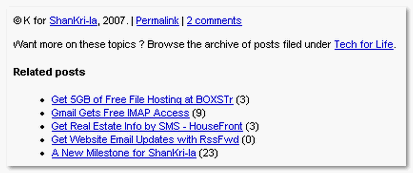
It is still quite natural to click the title of the post in the feed to get the link. I wouldn’t have found this if it weren’t for the gHacks post. So, hats off to them!
Does your blog feed has this FeedBurner redirect in post titles? Now, you too can make it easy for me to link to your posts.
Hello newcomer, did I say welcome to ShanKri-la yet? Before you move on, just wanted to thank you for visiting and we hope you come back and see us again!
If you enjoyed this post, get regular updates with our RSS Feed!


October 31st, 2007 at 7:12 pm
This is something I’ve done in my feed reader (GreatNews).
I guess it would make more sense to make the adjustment on my Feedburner account though
November 1st, 2007 at 2:13 am
Kyle.. that’s not a bad idea, eh? ..to grab the original feed in the first place. But, would it work if a blog uses plugins like Feedsmith to redirect it to Feedburner? Or is there another way to change that in GreatNews? I think it will definitely make it easier for others to grab your link and sped link or whatever they do with it. Less clicks to get it, more love for you. :grin:Between, our little bet is coming up this weekend. Are you ready to do a guest post on mine?
November 1st, 2007 at 8:06 am
K, Thanks, I’ve turned mine off. Now let me tell you why this is FANTASTIC for me:
When I’m reading feeds, I sometimes want to go to someone’s site to leave a comment. As you know I live in China. Unfortunately FeedBurner links are blocked here. That means, if someone has the FeedBurner link, I can’t get to their site simply by clicking the link. Instead I have to go to their site and try and find the post manually. That doesn’t sound like a big deal, but it’s annoying and there have been times when I’ve chosen not to bother with the comment.
That only affects me (or other people in China), but your point above about bookmarking or linking to a site, affects everyone. Why make it harder for people to blog about you?
If people really want the stats, fine, but I suspect most people have this on by default. Stumbled… And I’ll be posting about this.
Other notes: Google Reader still show the feedburner links for your site before October 2. I guess GR is cached and it will continue to use the old links for the past. But still this is great.
November 1st, 2007 at 12:02 pm
Stephen, you are very welcome. I remember your comments about FeedBurner being blocked in China but it didn’t occur to me when I was writing this. Yes, until I came across that tip, I had no idea this was a feature that can be turned off. The setting is well hidden and is not obvous even when you are looking at it.
I can only imagine your frustration to jump through hoops to comment but now that I know it means so much more that comment here so frequently besides the obstacles.
Appreciate the Stumble!
I think I have added you as my friend there.. in case I haven’t what is your SU login?
November 1st, 2007 at 7:24 pm
Nice post. Even i used to open each post separately in the browser when the actual address was not displayed. Now it is solved. Will save me a lot of time.
November 1st, 2007 at 9:17 pm
Madhur.. glad you found it useful! Definitely a huge time saver for me too. Sometimes, it’s crazy how a simple thing like this could be a huge time saver.
November 2nd, 2007 at 1:02 am
Hi K,
You’re right about that setting being hidden and no obvious. I have it on my list to post about your post, but it will probably be next week now before it appears.
The stumble was well deserved. Maurice (The Cayman Host) beat me to it by 13 hours. My address is http://stephencronin.stumbleupon.com/
November 2nd, 2007 at 12:15 pm
Stephen.. got you in my friends’ list! Just ping me from the toolbar if you are ever looking for some stumble love.
November 5th, 2007 at 10:36 am
K, Got you now… Likewise with the stumble love…
March 21st, 2008 at 11:37 pm
thanks for the link
dexter’s last blog post..Link Love # 10 :Filipino SEOContest2008 Contenders and Other Good Stuff
April 7th, 2008 at 11:23 pm
Ah ha! Thanks for the key! Now my CommentLuv will work correctly. Cheers.
Jonathan’s last blog post..189 High Quality Backlinks in 30 Minutes! And Growing!
April 20th, 2008 at 3:24 am
thanks for ur tips. i was remove my feed redirect.
chodirins last blog post..Blog saya sekarang DoFollow
April 22nd, 2008 at 9:53 am
Thanks for sharing this tip. I sincerely appreciate it! Thanks!
May 9th, 2008 at 1:59 pm
Thanks for the tip.
Davids last blog post..Fun new project
May 9th, 2008 at 4:01 pm
You are very welcome, David. I think it really helps out to link to someone while reading via RSS reader.
May 16th, 2008 at 11:15 pm
Many thanks for the advice, I have switched mine off as I feel a direct like might be better for SEO.
May 19th, 2008 at 4:57 pm
I’ve only just changed mine over - I don’t know how long that Feedburner option has been there, but it’s taken me 15 months since starting my blog to change it over!
Cheers!
Zaths last blog post..Free Tesco Mobile Sim Card
May 25th, 2008 at 7:52 am
I came to your post from another blog which highlighted the problem with the Feedburner redirects. Finding this has saved me time and will, hopefully, improve the readership on my site, so your post is very much appreciated. Thanks!
Elpies last blog post..Search Engine Spider View of Your Mambo Site
June 9th, 2008 at 5:08 am
Cool… I didn’t knew I could switch this off so a big thnx!!:D
BioTecKs last blog post..PC VS Mac: Part 1
June 10th, 2008 at 4:05 pm
BioTeck, you are very welcome. Hope you spread the word as I really would love to see everyone doing it.
June 26th, 2008 at 1:00 pm
I never thought of this nice tip thank you a lot. I applied this to my feed and seems to be working. Wonder how many redirected links I have around from participating in fellow bloggers blogs that have comment luv but are pointing to my feed.
Archie Penniess last blog post..Which are the most profitable niches?
June 26th, 2008 at 1:13 pm
Hi Archie, it warms my heart anytime someone comes across this tip and turns it off. So thanks a lot to you for taking the time to comment to let me know. I posted this before CommentLuv plugin was popular but it has become a very nice side effect for those using it.
Have a great day.