
I use OpenSUSE Linux 10.3 as my primary workstation at work. If you have ever played with Linux you might have seen how software updates are done. For those unfamiliar with it, in Linux you connect to a software repository and you can tell which of your installed software have new versions available and update them easily and install new ones as well. This lets me stay on top of security & bug fixes for various programs that I use regularly.
In the Windows world, this is totally unheard of. Unless the software has automatic update check enabled (I use this option as much as I can), you have to spend time manually checking for newer versions. Until now.
AppSnap – Get your apps in a snap
AppSnap has been an automatic software installer which provided a good number of software listing. You can choose the ones you like and AppSnap will automatically go to the Application’s 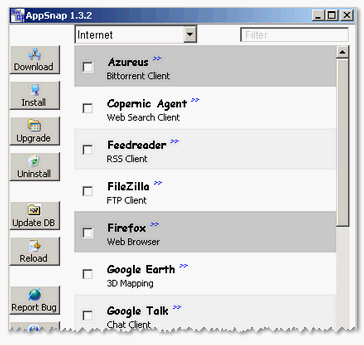 server and perform the installation for you.
Now, AppSnap’s latest version has added the capability to automatically check for updated versions for software that you have already installed. You can have it tell you which programs have new versions available and on your confirmation, it automagically updates your programs.
The number of software in the AppSnap database is limited but covers much of the popular freeware. For those who love to get dirty, Ryan of CybernetNews shows how you can use Yahoo! Pipes to translate RSS feeds from popular download sites to make your own RSS feed that notifies you of software version updates.
[via CybernetNews]


AppSnap looks pretty good.
I currently use FileHippo for this stuff, but I’ve been meaning to try them out.
Oh, I was going to Stumble this post, but I get a 404 message. Just FYI 😀
(I don’t have a Stumble toolbar on this PC)
I think it could be a powerful tool if we give it some time. But, it’s still useful as is.
Hey, appreciate the heads up and the effort to Stumble. I see that it’s broke for all posts. The url it’s trying to go to looks ok but I have to find out why it fails!