
Google Maps has become one of my main everyday search tools. I use it to lookup addresses, phone numbers for business and location at one shot and even sometimes use it to call the business right from the web.
Google Maps have added a couple of new features that I really liked.
Embed Google Maps in your Blog or Website
If you are a blogger, you are probably used to embedding YouTube or MetaCafe videos in your blog by just adding a HTML snippet. You can do the same to embed Google maps. The embeddable maps are customizable. You can select it’s size to a few different preset values or specify your own custom requirements.
This is very useful to everyone trying to share information with other folks through their websites or blogs. A business could just post a embedded map with their address in their site. Or you could share the map of the place you visited last weekend. Here is the map of one of our favorite State Parks in the west coast of Michigan.
Maps with Featured Content
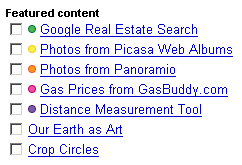
I just discovered this little hidden section in ‘My Maps‘ called the Featured Content. This section features a variety of content that you could add to the map you are looking at, like Real estate listings, Gas prices, Distance measurement, pictures, etc. You can just check the box for the content you wish to see and it appears in the Map.
Here are the contents currently listed in the Featured Content area:
- Google Real Estate Search
- Photos from Picasa Web Albums
- Photos from Panaramio
- Gas Prices from GasBuddy.com
- Distance Measurement Tool
Of all the above, I see the last two being very useful to me. I use GasBuddy to check gas prices before every fill up and I have started to keep track of my mileage and cost of my driving habits using MyMileMarker. Now, I can check gas prices right from Google Maps.
The Distance Measurement Tool is very useful as I can just click on any 2 points in a map I am looking at and find out how far apart they are! I can see it coming handy in situations like when you do not have the specific addresses to find driving directions or if you are trying to use the satellite imagery to see bike trails or hiking paths.
Google Maps is one of my daily used web apps and I love the fact that Google is continuously adding new and useful features to an already great product.
Google Docs get Context Menu
Unrelated to Google Maps, thought I would mention a new feature I noticed in Google Docs. Context Menus. You can now access a lot of the functions in toolbars with a right click. Neat. [via Google Operating System]


I actually just used the embedded Google maps in a blog post last night. It worked great for RSS subscribers, but didn’t show up for my e-mail subscribers. I wonder if that’s a feedburner bug or a google maps bug or something else?
You might actually be interested in the post I put up last night about Google maps use with public transit. I posted how you can use Google transit to help you find bus stops and transfers to get you where you want to go on Oahu. I’d really appreciate your thoughts on the feature. Thanks!
P.S. – I found you from Blog About Your Blog. 🙂
Sheila, welcome to ShanKri-la! I want to thank you for taking the time to comment!
I just checked out your post and left you a comment there. Very cool.
Being in a small town, I don’t use public transit but I am sure it will be of great help to my readers who might befrom bigger cities. 🙂
Well, darn…your comment must be lost somewhere in the blogosphere because it’s not shown up on my site or in my inbox. 🙁
Really? I thought may be it was awaiting your moderation! I will try again this morning.. 🙂
Just want to say what a great post this is. I have used Google maps for a few years now and really find it interesting and easy to use. I also like the fact that they are introducing new features which you have listed and can see them being a big hit with people. I live in the UK and I’m not what you would call a city person therefore when I head down to London it really helps to find those unfamiliar streets or businesses.