
Are you tired of your old Windows Explorer’s plain looks and lack of killer features that could make you more productive? You’d probably like this if you are like me and keep going back to Windows Explorer out of habit even if you have a Windows Explorer alternative installed.
There are several other free alternatives to using Windows Explorer that offer superior functionality. But, this guide is for anyone interested in tricking out Windows Explorer itself to their likes.
Windows Explorer Tabs (XP & Vista)
If you are a Firefox user, you have probably learnt to love the convenience, power and productivity (often times) brought to you by tabs. How would you like it if you could surf through your computer’s folders and files with tabs in Windows Explorer?
QTTabBar is a small freeware that lets you do just that. Windows XP & Vista users can use this program. Windows XP users need the .NET framework 2.0 installed for this to work though.
Some quick facts:
- Favorites
- Tooltip previews
Windows Explorer Folder Size (XP)
When your computer is running out of space, you would start by finding out which folder is taking up the most space. Usually, you’d do it by taking a wild guess and check the folder ‘Properties’ to find out the size of a folder and start cleaning up from there.
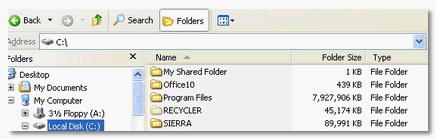
With this free utility Folder Size, you will be able to see the size of every folder right in your Windows Explorer just like you see the sizes of files.
Change Windows Explorer Default Location (XP)
Have you ever been annoyed by the fact that Windows Explorer opens ‘My Documents’ folder every time you open it? How would you like to change the default location to be anything you want?
Brown Baron of Brown Thoughts has an excellent write-up showing you how you can easily change this in your computer with screenshots.
If you are a power user, all you have to do is to go to Windows Explorer’s Properties and change the Target field to the following, if you’d like to default to C:\music folder.
c:\windows\explorer.exe /n,/e,c:\music
Trim your Windows Explorer Context Menu (XP)
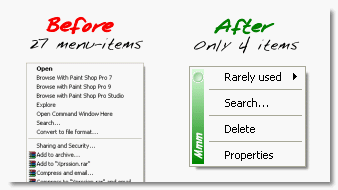
Most software you install on your Windows desktop add some form of context menu entry to your Windows Explorer making the content menu too long to be useful. Now, you can trim the fluff with a free software called MMM. You could optionally hide menu items or move rarely used items to a submenu.
 Vista Explorer Breadcrumbs for XP (XP)
Vista has a nice feature in Explorer in offering breadcrumbs navigation in the location bar. Breadcrumbs is a way of showing links back to the homepage along with the links clicked to get to where you are.
With the free QT Address Bar utility, you can have this same functionality in Windows XP without upgrading to Windows Vista. You do need the .Net framework installed.
Add Favorite Folders to Title bar (XP)
With FileBox Extender, you can add favorite folders to your Windows Explorer window. Better yet, these shortcuts are accessible via keyboard shortcuts so you can jump to your favorite folders without touching the mouse.
FileBox Extender adds to 2 buttons to the title bar for accessing recent and favorite folders. It is a freeware utility.
I would love to hear what you think about these enhancements for Windows Explorer.
[via Brown Thoughts, gHacks, HowToGeek ]
Vista Explorer Breadcrumbs for XP (XP)
Vista has a nice feature in Explorer in offering breadcrumbs navigation in the location bar. Breadcrumbs is a way of showing links back to the homepage along with the links clicked to get to where you are.
With the free QT Address Bar utility, you can have this same functionality in Windows XP without upgrading to Windows Vista. You do need the .Net framework installed.
Add Favorite Folders to Title bar (XP)
With FileBox Extender, you can add favorite folders to your Windows Explorer window. Better yet, these shortcuts are accessible via keyboard shortcuts so you can jump to your favorite folders without touching the mouse.
FileBox Extender adds to 2 buttons to the title bar for accessing recent and favorite folders. It is a freeware utility.
I would love to hear what you think about these enhancements for Windows Explorer.
[via Brown Thoughts, gHacks, HowToGeek ]


Very nice! Now that’s how you do a makeover. Stumbled 😀
Thanks buddy! I’ve seen this covered individually by yourself and others lately. Figured it would help to have ’em all listed in one place! Appreciate the stumble. 😀
Great post buddy. I am loving the Qtabs bar.
Madhur,
Thanks a lot! Me too.. I’m going to keep updating this post as I find more stuff! I hope to make it a bookmark quality!
“FlashFolder extends the file-related common dialogs (e.g. open/save dialog) seen in most Windows programs. A small toolbar docks onto these dialogs that provides menus for quick access to recently-used folders, favorite folders and more.”
http://sourceforge.net/project/platformdownload.php?group_id=195039&sel_platform=3458
Hi Everybody, I’ll have to try this utility. I find it really interesting! Thanks for taking the time to comment and welcome to ShanKri-la!
K, once again, you’re enriching my computing experience – I’ve downloaded several of these and will experiment tonight. Thanks!
You are very welcome, Stephen! I am glad you liked it. It’s funny how some posts become such a hit that you never dreamed of. On December 2nd, I had more than 5000 unique hits for just this post. That’s half my usual monthly traffic! LOL I love StumbleUpon!
K – Wow, 5000 is huge! But then again this post is worth it as it makes people lives easier. Keep it up!