
While Google’s PageRank team have been busy penalizing the big players with a penalty sweep, GMail team has been busy adding IMAP support to GMail.
I have tried using POP3 with Thunderbird but I missed the features available with IMAP. One of the main IMAP feature is that it syncs both ways. So, if you delete or mark a message read in your email client such as Thunderbird, it automatically reflects in your web account as well.
IMAP makes accessing your email from multiple devices such as your browser, email client, mobile phone or Nintendo Wii a snap. Google has made this excellent feature available for free and they are rolling it out to all the accounts as I write this.
In fact, my account already has it and I am having fun with it.
Here are a few quick steps to set it up in Thunderbird: 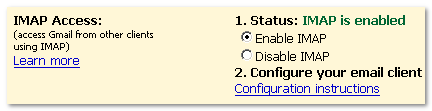
- Go to Settings in your GMail account
- Click on Forwarding & POP/IMAP
- Enable IMAP & Save Settings
- Follow the configuration instructions
- Remember to enable SSL & set port to 993 in IMAP – Server Settings
- Remember to choose TLS & set port to 587 in SMTP settings
With that you should be able to enjoy the power of Thunderbird at home/work while you have the great web interface anytime you need it.
For the USB drive addicts and for the lucky winner abut to win the 1GB USB flash drive, there is a portable version of Mozilla Thunderbird (6.7MB) available at PortableApps.com.
If you are looking to find out how to use it with your iPhone, here is a YouTube video.
What do you think about this new feature?


Google seems to be really busy these days. They still haven’t added folders to Gmail though Thanks for the link buddy!
awwwwwww very interesting.
I may actually start using Thunderbird now!!
@Brown.. yes they are! If you are looking for folders you might have to wait a very long time.. buddy! 😉 You are welcome by the way!
@Forest Parks.. I see you use Mac OS X. What do you think about the Leopard release? Are you going to upgrade as soon as it is out? 😀
I’m not sure yet. It’s $95 of cash that I could put towards a nice shiny Ipod Nano instead!!
Hmmm
It seems that I should move on to Thunderbird now.
😛
Brown Baron – You can get the Greasemonkey Script Folders4GMail (I think its called). It works great and won’t be able to tell it is a script.
@Forest Parks.. if you save some more maybe you could get an IPod Touch instead! Unless you already have an iPhone though.. 😮
@Roxi.. I can see it as useful but I have to figure out the nuances in using Thunderbird & how Gmail works.
@Kyle.. I love that GM script. It makes categorizing labels so easy and a god send for converting Yahoo lovers. 😉
I just configured Gmail IMAP on ThunderBird and it’s just great. I’ve even got my labels now on Thunderbird 😯 . Much better than POP. 🙂
Shankar.. it is so much greater than POP3! Kyle mentioned this great Lifehacker article on how to setup Gmail IMAP with Thunderbird. Even if you have already set it up, it’s worth a read as it has many other tips as well. 🙂
This is the content I was looking for.Great job on your website.TY